


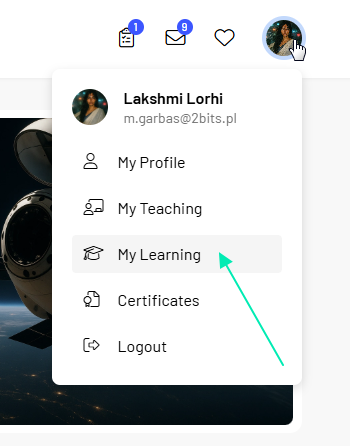
The My Learning section provides access to the training courses associated with your account. Here you can find courses you have enrolled in or that have been assigned to you, along with information about their status and progress.
From here, you can find a training course, check its status, start learning, or return to a course you have already started.
Training courses in the My Learning section are displayed as tiles containing basic information about each course and its current status.
To find a specific training course more easily, you can:
These statuses allow you to quickly identify which training courses you have not yet started, which are in progress, and which you have already completed.

You can launch a training course directly from the My Learning section.
To start or continue a training course:
If you have already started the training course, you can return to it from the same place.
Note: How you complete a training course depends on its content and configuration. Using learning materials, taking tests, and completing other course elements are described in the Completing a training course section.
The Session Schedule section allows you to check the dates and times of sessions associated with your training courses. Days with scheduled sessions are marked in the calendar.
To check the details of a session:
The session details may include:
From the session details, you can also select Play course to go directly to the training course.

Important: When checking the scheduled time of a session, pay attention to the time zone displayed in the session details.
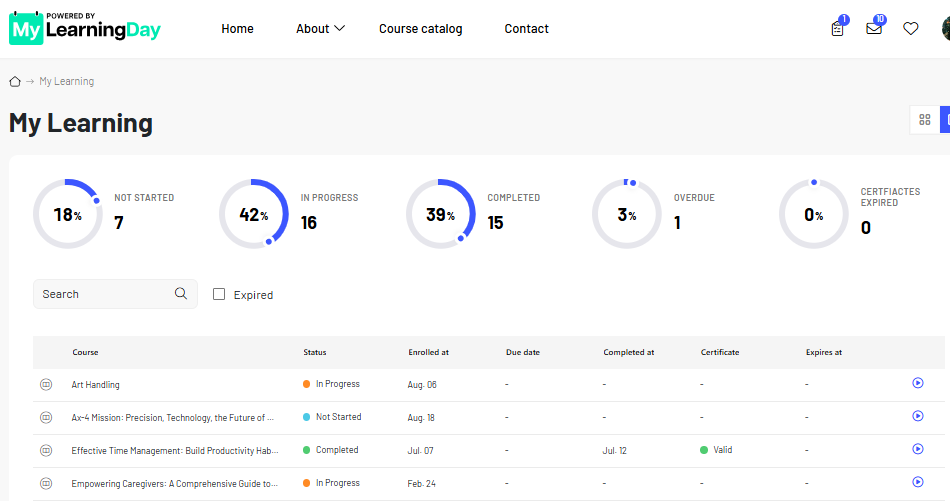
In addition to the tile view, the My Learning section allows you to switch to a detailed view.
This view provides more information about your training progress and certificates without requiring you to open each training course individually.
It can be particularly useful when you want to quickly check the status of several training courses or review information about certificates you have earned.
Progress and certificates
In the detailed view, you can monitor your training progress and see which courses:
The available summaries and charts make it easier to quickly review your current learning progress.
If a certificate is awarded for completing a training course, you can also check its status and validity.
For certificates with a defined validity period, you may find information such as:
This is particularly useful for recurring training courses where certificates remain valid for a specific period of time.
Note: Not every training course awards a certificate upon completion. A certificate may also have no expiration date. This depends on the configuration of the individual training course.
See also: Completing a training course and My Certificates